Email Logging and Privacy
MailSentra observes email attempts made through WordPress wp_mail(). It writes a pending log before the mail attempt and updates the result from WordPress mail hooks. If writing a log fails, email sending continues.
Logging modes
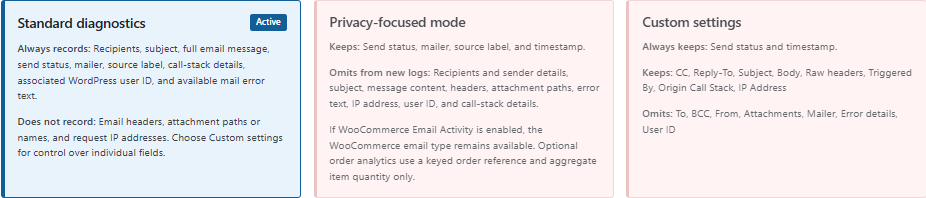
Standard diagnostics
Standard mode records recipients, subject, the full message body, status, mailer, source label, call-stack details, associated WordPress user ID, and available mail error text. It does not record raw email headers, attachment paths or names, or request IP addresses. MailSentra does not copy or store attached files.
Privacy-focused
Privacy-focused mode omits recipient and sender details, subject, message content, headers, attachment paths, error text, request IP address, user ID, and call-stack details from new logs. Status, mailer, source label, and timestamp remain available.
Custom (Pro)
Custom mode lets Pro users choose which supported fields to capture. Review the settings carefully before enabling fields that may contain personal or sensitive information.
Existing logs
Changing logging modes affects new logs only; existing log entries are not rewritten. Use Delete All Logs on the dashboard to erase the history.
Data storage
MailSentra stores logs in the site's WordPress database. It does not send logged email data to an external service. Set a suitable retention period and include email logging and any enabled open tracking in your site's privacy disclosures.